 Discs IndexBrowse or share your CD and DVD archive
Summary
The ultimate tool to search your DVD or CD-ROM collection. Discs Index is also a great tool to share your CD catalog with friends. Discs Index scans your DVD, CD-ROM or hard drive and saves the information from one or more discs to a portable file. This file can be viewed with Discs Index on the same or another computer.- Add a disc with its title, vendor, media type and a memo, with or without the file names, or a virtual disc without reading its contents.
- All discs and their folders in a tree, with the details of the selected disc.
- Search in the titles, vendors, memos, directory names and file names, while you type.
- Double-click a .dix datafile in Windows Explorer to open it with Discs Index.
Installation
If necessary, you will be prompted to install the required .NET Desktop Runtime when you launch the app. When you launch a newly released version, Windows may display a warning. If you see the message "Microsoft Defender SmartScreen prevented an unrecognized app from starting." you can click "More info" and then "Run anyway". Alternatively, open the properties of the .exe file and select the "Unblock" checkbox. Read more...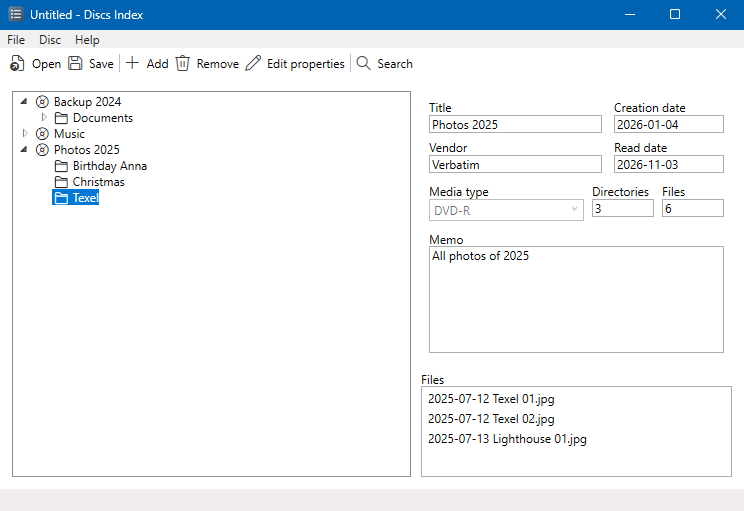
Product:
Discs Index
Version:
2026-11-03
Package:
513 KB, zip-file
Platform:
Windows 10 and 11
Release notes:
2026-11-03
Online manual (Help > Manual)
The number of files is also counted without the file names
The number of files is also counted without the file names
2026-10-20
Search bar that searches while you type (Find next with F3) instead of the Search dialog
Toolbar with Windows symbols
Context menus in the tree and the file list
Automatic update check
Toolbar with Windows symbols
Context menus in the tree and the file list
Automatic update check
2026-10-12
Ported to .NET 10 (Windows 10/11)
No administrator rights needed
Standard Windows look
No administrator rights needed
Standard Windows look
2020-11-04
Version 0.4: Update contact information
2004-02-05
Version 0.3: Disc creation date added
2003-11-09
Version 0.2: First public release